This article was originally meant to be published on 10th October but it was 0030 hours when I was writing this article and I just went outside to roam around my hostel and then finish the rest of the article, the stupid cat in my hostel floor scratched me at 0100 hours. Today I had my third dose of Rabies vaccine and I remembered I need to complete this article haha…
So I was vibecodin’ the koi fish pond effect on my professional website and it was going pretty well, at first I tried one shoting with the new deepseek 4.1 pro model, didn’t work quite well, so I had to build somewhat of a small base step-by-step, like I made a single stationary fish with a sin wave tail and it follows the mouse cursor upto a certain curvature, I figured out using mesh distortion is better than using the meshrope thing (idk the terms that much, I am not that good with pixi js). Anyways all works fine, probably something the best ai models could have one-shotted, then I asked the model to repeat the fishes, make them follow random path, add lotus, add fish from the textures I had drawn blah blah. Then I added a caustic shader from shadertoy. Tune the color and I get really close to exactly what I wanted. It was so beautiful on Firefox… and then I opened the website in Chromium and oh god… It was so terribly broken and the worst kind of breaking you know — the one where there is no logs or error, the output simply doesn’t match.
I don’t know how to describe it… like the fishes and everything was completely gone and I could see only a few lines of the caustic shader that too drawn at random places. It definitely looked like some kind of memory issue… but memory issue in JavaScript? Well… my first and obvious (sadly, I must admit, this is a really bad habit I’m developing) was to prompt LLM to fix it… and I tried plenty of model, the GPT-6 Astra, Sol, the latest deepseek model, the latest GLM model, all of them just took a screenshot from headless Chromium, hypothesized that something might be wrong and simply wrote a million line long sed/awk command to replace and “fix” it, thing is it never knew what the actual problem was. At the end of the day it’s just a mathematical text generation model, it really can’t solve problems it has never seen with step-by-step approach like a human engineer.
So I start the ancient art of… commenting and adding random print statements… well not actually, because this is a graphical project, but you get the point, eh. Look, it looks pretty obvious to me when something is a memory issue, because like it gives weird result while still resembling a part of output you originally desired. there was like a sharp ~30 degree straight line through the frame buffer below which only the caustic shader was rendering and above the line, there was only black screen. So I suspected the shader to be at fault, since it has shaders and everything which could be messing with the memory, so I disable the math equation, make the entire stuff static, check around by changing colors to debug. (BTW, I did not use AI for this part… I will tell about this part later in the post) I did not find any issue with the shader surprisingly… so I moved on to the main typescript file, there as I was trying to isolate the issue, I found something… if you disable the noise generation function I had for making sand at the bottom layer… then rest of the graphic simply starts working …? The fish start swimming, the lotus, the lily-pads, everything returns back in Chromium and the outputs are similar again. Now here’s the thing, I had no clue how a simple noise function could cause a memory issue, so this time I asked GPT-6 Luna model with why isolating this noise function causes the issue to go away, and now it didn’t take much time for the chatbot to just figure out what was wrong because it has seen this pattern before. Turns out the precision my code as asking for was less than what was required. So I just add a line of code to request a higher precision number and viola! It started working on Chromium with same result as Firefox.
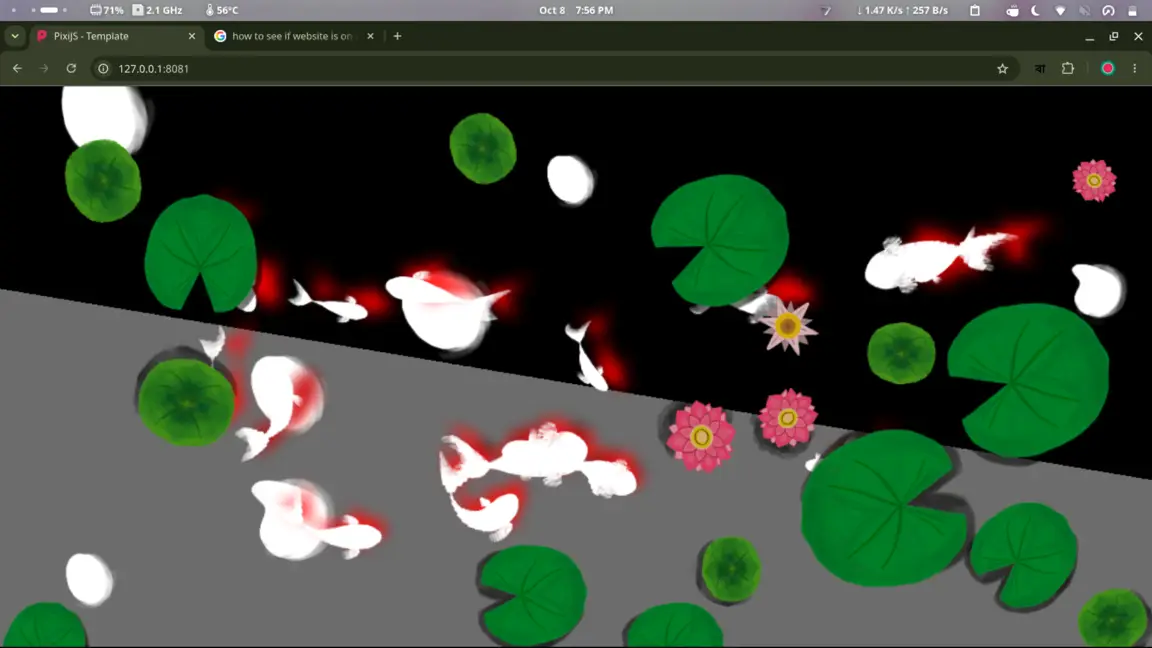
This is how I was taking things one-by-one, first by fixing the lily pads and fishes. See how I made the fish shadow color red to debug it better
So why did I mention I did not use AI specifically for a part before? Because I think AI is too expensive and simply ehhh for doing that part specifically. I simply can’t ask the LLM chatbot to just go and figure out by commenting and un-commenting each and every line to isolate out the issue. So basically what I am proposing is, that the chatbot will try to isolate out the issue in its debugging stage before thinking about why the issue could be happening. Generative AI is really good as a tool for programmers. Afterall Linus Torvalds himself trusts LLM generated code over the C++ compiler (/sarcasm). Like the issue wasn’t that AI could never solve the issue, it’s simply that in such a huge codebase, you can never know that, that is the issue at first glance. Because once I had isolated the problematic code myself, it didn’t take much long for a cheap model to figure out what was going wrong and immediately fixed it, so the bug was definitely within the reasoning capability of the chatbot. Hence, I think LLM should be taught a new way to debug and look at things, when stuff doesn’t work.
